HDHomeRun multiview: four channels on one screen
Sunday afternoon, three games on at once, and your HDHomeRun has the tuners to receive all of them. What it does not come with is a way to put them side by side, and most of the apps that do multiview only do it on one kind of device.
TIBBL is a DVR for the HDHomeRun, and multiview is part of every plan. In the TIBBL web app you can watch up to four live channels from your antenna on one screen today, choose how they are arranged, and choose which one you hear.
How multiview works in TIBBL
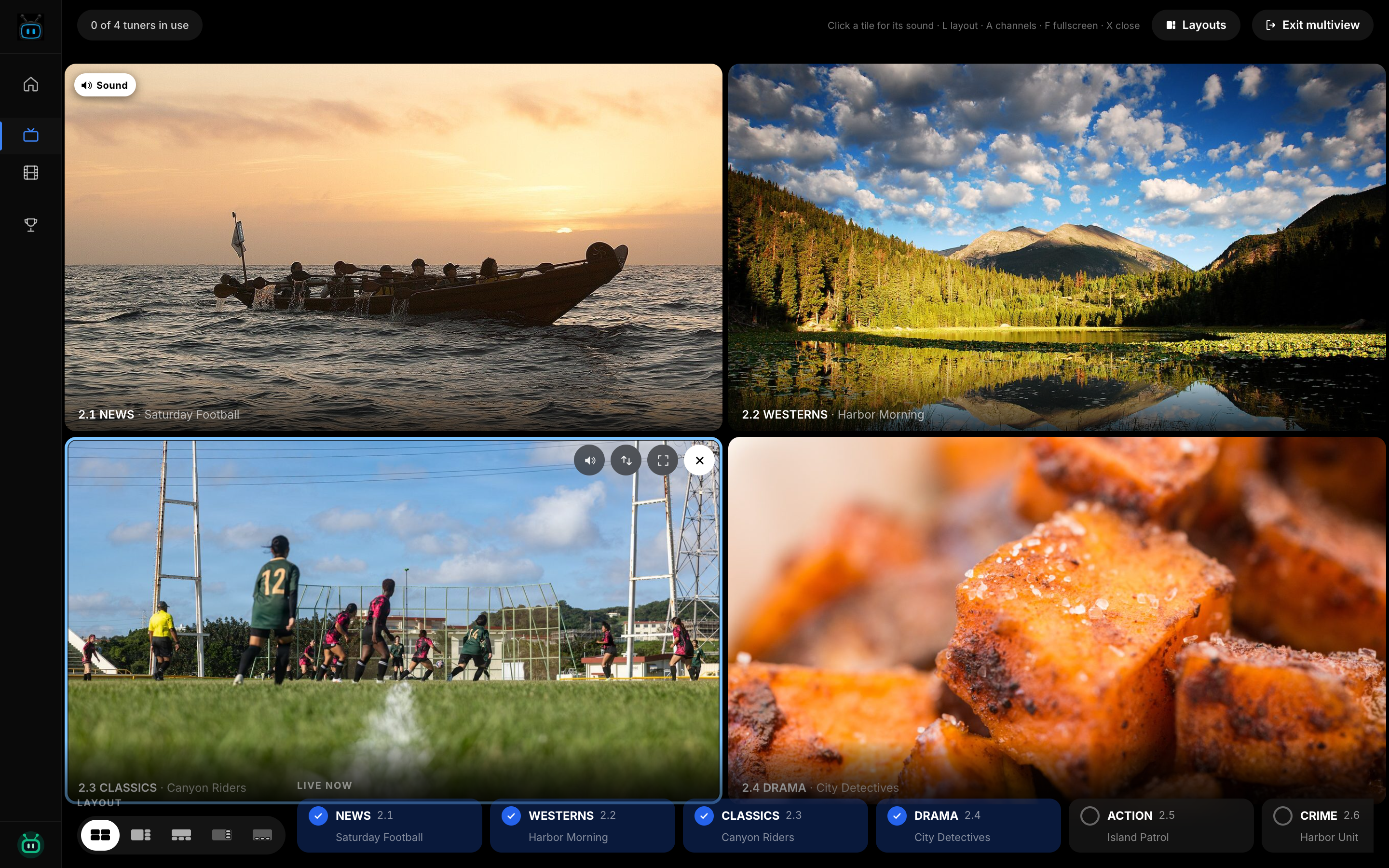
Open a channel, press Multiview, and add more channels from the strip of what is on now. Each channel gets its own tile with its own live picture. You can have two, three or four.
There are five arrangements. Grid of 4 gives every channel the same space (with two channels it becomes Side by side). Featured puts one big channel on the left with the others stacked beside it, and Featured on top puts the big one above a row of smaller ones. Picture in picture keeps one channel full screen with another in a window in the corner. Full screen + strip fills the screen with one channel and runs the rest along the bottom, so you can glance at the scores of the other games.
Sound comes from one tile at a time. Press Use this audio on the tile you want to hear, and the others stay muted until you switch. When you find an arrangement you like, save it as a layout and reopen it next week with the same channels in the same places.
How many tuners you need
Every antenna channel on screen is received by its own tuner in your HDHomeRun. Four different channels need four free tuners. The same channel in two tiles only uses one, and a recording that is running also holds a tuner while it records.
So the tuner count of your model is the real limit. The HDHomeRun FLEX 4K and CONNECT QUATRO have four tuners, enough for a full grid when nothing else is recording. The FLEX DUO and CONNECT DUO have two, so they show two antenna channels at once.
ATSC 3.0 (NextGen TV) channels do not play in TIBBL yet, because no player we can ship decodes their AC-4 sound. Their regular ATSC 1.0 versions, which most stations still broadcast, work normally.
Each antenna channel on screen uses one HDHomeRun tuner, and so does each recording in progress.
Where you can use it
Multiview works today in the TIBBL web app, in a browser on a computer or a tablet, and on a phone turned sideways. Plug a laptop into the television and it becomes a four-game wall. In portrait, a phone goes back to a single picture, because four tiles on a narrow screen are too small to read a score.
The TIBBL apps for Fire TV, Android TV and Google TV have multiview built in and are out now, and the Roku app has all five arrangements too. The Apple TV, iPhone and iPad apps have it as well and are with Apple for review.

Other ways to get HDHomeRun multiview
You have options, and it is worth knowing them. Channels DVR has a multiview of up to four channels, but its own documentation says it runs on Apple TV 4K and iPad only, and is not part of the cheaper Channels for HDHomeRun app. The independent Multiview App on the App Store can show HDHomeRun channels side by side for a one-time upgrade; it is a viewer, not a DVR, so it does not record.
TIBBL's case is that multiview sits inside a full DVR. The same app that shows four games also records them, finds the ad breaks afterwards, and plays them away from home.
What you need, and what it costs
An antenna, an HDHomeRun network tuner, and a computer that stays on to run the TIBBL recorder: a Mac with Apple Silicon, a Windows PC or a Linux PC. Recordings go to that computer, in a folder you choose.
One plan with everything: $5 a month or $50 a year, after 14 days free.
Today you watch in the TIBBL web app, in a browser on a computer, phone or tablet, on Roku from the Roku Channel Store, on Fire TV from the Amazon Appstore, or on Android TV and Google TV from Google Play. The iPhone and iPad, Apple TV and Xbox apps are with their stores for review.
Questions people ask
Which app lets me watch several HDHomeRun channels at once?
TIBBL shows up to four HDHomeRun channels on one screen in its web app today, as part of a full DVR. Channels DVR has a four-channel multiview on Apple TV 4K and iPad, and the Multiview App is a viewer for several tuner brands that does not record.
How many channels can I watch at once with TIBBL?
Up to four on one screen. Each different antenna channel needs a free tuner in your HDHomeRun, so a two-tuner model shows two antenna channels at once and a four-tuner model shows four.
Can I choose which channel I hear?
Yes. Press Use this audio on the tile you want to hear. The other tiles stay muted until you switch.
Does multiview cost extra?
No. Multiview is part of TIBBL's one plan.
Does multiview work on a phone?
Yes, in landscape. Turn the phone sideways to see the tiles; in portrait it goes back to a single picture.